Do a creative project every day for four straight days.
Projects must be completed in a day, so they need to be as compact as they are creative
Each project needs a name and documentation posted by the end of the day. Each should be a stand-alone accomplishment
Towards a Notation System for Foosball
By Greg Borenstein on August 2010, Day 4
Foosball is the national pastime of ITP. An old, beaten-up, much beloved table is a fixture on the floor and during semesters a game is almost always in progress, from busy daytime hours when the clunk of the ball adds to the overall noise of the floor to late night procrastination sessions when students round up whoever’s around to play intense games meant to block out any thought of a looming deadline or mountainous pile of work.
I’d played some foos before coming to ITP — most notably at UC Riverside with my cousins after a series of summer softball games — but, in my first year at ITP, I’ve become predictably obsessed: trying my best to learn from the masterful 2nd year players who, at the start of the year at least, routinely routed me.
In the course of this foosball education, I began to come up with certain theories. For example, I noticed that players were divided into those who moved both hands between the handles (advancing to the 5-man and the 3-man when on offense, for example) and those who kept their left hand anchored at the goalie, only advancing with their right. I instinctually favored the latter approach, feeling that scoring opportunities were created for the other player whenever hands moved: a left hand-anchored approach minimized movement and hand-off-handle scoring opportunities. Similarly, I started to see that a lot of the best players shared a certain style of passing and shooting from the outside players of the 5- and 3-man rows that was especially effective. Also, a few players (most notably Jeremiah Johnson) used their lightning quick reflexes to play an aggressive kind of defense where, instead of simply blocking an opponent’s attempt to move the ball forward, they’d slap it back at full speed, as if hitting it from their own possession (an especially deadly move against the opponent’s defense where it frequently results in a goal).
I started to wish for a formal vocabulary to describe these trends and ideas I was seeing and some structured way to test my hypotheses, a procedure that would allow me to transcribe and keep statistics on games in order to better understand them and discuss them. I realized that I needed a notation system like exists for chess or baseball, something analogous to the “1-6-3 double play” or ” Bxd7+” (bishop to D7, check). And, on Scott Wayne Indiana‘s suggestion, I sought a system that could be represented visually (like a baseball scorecard) to enhance transcription.
So, for my final 4-in-4 project, I set out to design such a system.
Starting from Scott’s suggestion about the baseball scorecard, I started by designing a simple graphical representation of the foosball table. I then labeled each handle with a “B” or “W” (for Black or White) representing each side (at ITP, at least, the actual players can be nearly any color, having been repaired, replaced, and becostumed so frequently) and a number corresponding to how many players were attached to that row. Hence: B5 would be black’s 5-man row and W1, white’s goalie. Then, for the multi-man rows, I added letters for each man so that the notation system could also capture which specific man hit the ball. For example: “W3a” would mean that white hit the ball with the man furthest from them on their 3-man row.
I also included the handles in the diagram because I knew that the position of the players’ hands at the time of each contact with the ball was important data for exploring my theories about handle strategy. It also, when you have a series of events in sequence, turns out to give a really nice feeling of the momentum or drama of a moment of play. I didn’t try to include the hand-on-handle positions in the written notation system as I wanted to make it easy and intuitively understandable. I’ll present some real examples in a minute, but if I said: “W3a to W3c for the goal”, you’d easily be able to picture a lateral pass between the two outside players on white’s 3-man row followed by a scoring shot. All the extra cascade of notation that would be required to capture hand position would only water down that flavorful little bit of drama.
Now: an example of the notation in action! I printed out a handful of sheets of paper filled with a grid of scorecards and recruited Mike Cohen and Jeff Howard to play.
I told them that, after each goal, I’d interrupt them to transcribe the events that led from from the last coherent possession to the goal. In theory, it would be great to transcribe an entire game and to do statistical analysis on the resulting data, but that would require adding sensors or a camera tracking rig to the foosball table (not that it hasn’t had both of those things applied to it before, the thing bristles with the leavings of old class projects) and spending inordinate amounts of time getting the technology working rather than focusing on the notation which was the point of this project. I would love it if someone constructed a system for machine-generating this notation automatically at some point, but it was beyond the scope of this one-day project. With that in mind, I figured incidents of scoring were the most interesting thing to transcribe and also imminently doable.
I designated Mike “Black” and Jeff “White” and had them kick things off. Before too long, Jeff scored the first goal. I had the players pause and reconstructed it thusly:
See the larger size on Flickr.
This diagram might appear dense at first glance; let’s break it down. First, look at the notations on the handles. White has his hands on W3 (the 3-man) and W5 (the 5-man), a position I soon dubbed “classic offense”. Black is on B1 (the goalie) and B2 (the 2-man): “classic defense”. Their hands stay in those positions for all four events of this play. Now, look at the red ‘x’ that moves between the four diagrams: at first between two of white’s players and then into the goal. That’s a fancy bit of passing on Jeff’s part before the shot that scored; he knocked the ball laterally from the middle 3-man (W3b) to the one closest to him (W3c) and then back to take the shot. So, in the final notation, this play reads as: “W3b W3c W3b W!” (where “W!” reads as “White goal”).
You should be able to start to picture it in your head now: Jeff starts with control of the ball at the middle of his 3-man. Mike is back in defensive position. Jeff passes the ball to the side; Mike adjusts his defensemen to follow. Then Jeff passes it back to the middle, where he slaps it directly into the goal before Mike can recover. A classic bit of foosball strategy: using lateral passing between the 3-man to shake the defenders and create an opening for a goal.
The game continued looking much like a whipping administered by Jeff who got up to a 6-0 lead before Mike scored his first goal. I’ll revisit some of those earlier goals in a minute, but first I wanted to show another, even simpler, goal: #5 of the match:
An incredibly straightforward goal: W3b W! with both players in “classic defense” and “classic offense” throughout. Jeff controlled the ball with the middle player of his 3-man handle and then shot it past Mike’s goalie and 2-man and in.
The goal immediately before that was nearly as simple. At this point, you should be able to imagine the whole story just from the notation: W5c B1 W!:
Now, let’s talk about some goals that relate to the theories that set me off on this project in the first place, for example #6: W5c W!:
At first glance, it looks nearly as simple as #5, just coming from W5 rather than W3. But look at the position of the handles in this exchange. Black starts off with his hands on B2 and B5. His goalie is untouched. White has control of the ball at W5. Black was caught in transition, right in the middle of trying to move his hands up towards “classic offense” when White got control of the ball at W5. The second position shows even more evidence of the chaos caused for Black by this reversed transition: he actually had only one hand on a handle at the time of W!: B5. His left hand was probably moving back towards B1, retreating in the face of White’s sudden possession of the ball, but not yet having arrived to take charge of the goalie.
And look at White’s hand position by contrast: he’s on W5 and W1. Probably starting from classic defense a few seconds earlier, he advanced only his right hand, keeping his left anchored on the goalie, making for maximum stability and speed during the transition play, which let him pound the goal in from midfield in the midst of Black’s chaotic transition.
Obviously, from the way I’m telling the story of this goal, I think it counts as evidence for my transition theory in favor of playing with a hand anchored at the goalie. And, in fact, the next goal in the match, Black’s first, offers more evidence in support:
This time, Black is anchored with his left hand on the goalie when he shoots, only having advanced his right hand to B5b to take possession. White is on W5 and W2, one of the weakest positions on the field: back on defense but with no anchor on the goalie and no hand on it to prevent deflections or allow for quick reactions. And, what’s worse, as we can see from the hand positions in the second frame of this goal, White is also in transition: both of his hands move between B5b and B!, meaning, while the ball was in travel, he was, in fact, touching no handles. Black’s hands have both also moved, but this has no bearing on the result of the play as he does not touch the ball again. In fact, if White had been able to prevent the goal, Black might have been left quite vulnerable to the kind of quick reversal we saw in goal #6 due to being in transition himself.
This is a strong goal for Black and there’s a reason it dramatically changed the momentum of the game. Up to this point, many of White’s goals were scored in the position I’ve described as “classic offensive”, i.e. with hands on W3 and W5. While this is an especially strong position for players (like Jeff) with lots of good fine shooting and passing skills (checkout White’s goal at #11 for example) it is also especially vulnerable to transition scoring if the opponent can kick the ball up field: from classic offense, you inherently have to move both hands in order to retreat at all, creating lots of transition time for an anchored opponent to pass or shoot. After this first occasion, Mike seemed to get into a rhythm in exploiting this weakness in Jeff’s style: advancing the ball aggressively out of a seemingly defensive position and then proceeding to score while Jeff was forced to transition both hands back (Goal #8 is another great example of this). Though Jeff would go on to win 10-5, Mike kept up goal-for-goal from this point, losing so badly only because of the nearly insurmountable lead Jeff had built up with those first series of goals.
In fact, the second half of the game is replete with bank shots from deep within Black territory (B2), shots from B2 while White is still in classic offense, and combinations of both of those effects.
You can see all of the goals for this game notated in this flickr set.
So, hopefully at this point I’ve demonstrated my notation system’s virtues for recording and re-telling the story of a game as well as for making strategic and tactical arguments such as the one I’ve been rehearsing here about the importance of transition play and hand position.
Given all of that, I did discover a few downsides to the system in using it for the first time. For example, my graphic doesn’t include the foosholes so, if a goal was scored directly on foos, or if a machine was to attempt to transcribe a full game, that’s a lack that would need to be addressed.
Also, as you can see from this picture:
The scoresheets that I printed out did not include the lettering and numbering key I’ve included in the graphics presented here. I was trying to keep things simple and minimal. The main problem with that decision was that there were no visual cues for reading the orientation of the sheet: a couple of times I got started notating only to realized that I had black and white reversed due to the symmetry of the sheet. So, when I print out further sheets, I think I’ll use the notated version for clarity’s sake.
Another problem with the system is that it can occasionally be difficult to reconstruct complex interactions. Take, for example, this goal: W3c wall B1 W!
Clearly, the ball bounced off the wall after White’s shot in a manner that surprised and evaded Black’s goalie. But, you don’t quite get as vivid of a picture of the logic at play as you do with better structured goals. It’s my suspicion (or at least my hope) that this kind of ambiguity would be greatest with goals resulting from “slop” — the disorganized caroming of the ball around the table and off random players without the meaningful intervention of human intention — which, I think, you could argue is actually a virtue of a notation system, which must inherently reduce, simplify, and structure the thing it describes.
There was also a sense amongst the players that my notation didn’t capture certain subtleties of particular goals, the angle of a shot that slipped in behind the goalie, for instance. This is definitely true, but again, I don’t have a clear sense of how to capture that without making the notation system unwieldy. My intention is not to eliminate the need for human commentary, only to augment it and enhance its concision and clarity.
Topics for future research. Speaking of printing out further sheets, I plan to print out a handful of them and attach them to the ITP table so they’ll be to hand for anyone who wants to sketch down a particularly interesting play or series of goals they see happening. I also plan to transcribe some additional games and to try to make a bit of a catalogue of signature plays and tactics that I’ve come across. And, of course, there’s always the grand dream of machine transcription, which I intend to push on any unsuspecting first year looking for a topic for a camera tracking project or pcomp midterm.
Add comment | August 31st, 2010
Fine Ruby…I give in
By Mike Cohen on August 2010, Day 3
I’ve spent the prior 7 years to ITP doing enterprise Microsoft programming using ASP classic w/ VB Script and ASP.NET w/ VB and C# on top of a Microsoft SQL database. This was good for the kind of projects I worked on. Nowadays I don’t really find myself working with 55 million row databases so often, but I still feel the urge to use languages that are made for bigger projects. I was ready to attempt to delve into interpretive languages. I was thinking Python or Ruby. I’ve heard about headaches with Python and it always seemed like a language purely for parsing text and data, so I went with Ruby instead. Sitting next to Greg, I said “what’s a good place to start with Ruby?” He immediately sprung into action showing me why’s (poignant) guide to Ruby and Learn To Program, a basic programming tutorial using Ruby as it’s language.
Going through why’s (poignant) guide to ruby brought some humor and made Ruby make a lot of sense very quickly. It’s extremely readable and easy to run. After reading and trying code for a few hours, I looked for some libraries. I found osc-ruby. Finding this made me think…I should try the Monomothello game using that. So therein lies the project for Day 4.
Add comment | August 27th, 2010
Othellonome in Java/Processing
By Mike Cohen on August 2010, Day 2
Efficiency Fail.
Taking the advice from a friend, I tried making the classic game, Othello for the Monome.


![]()
OTHELLONOME!
So I started with the monomic library for Processing. In my head, this was really easy. I wrote a bunch of code and realized…”hey, I can’t connect to my monome.” After playing around for an hour, I decided that I should just use OSC straight up to connect, so I switched over to just using oscP5. This also proved a small challenge being less familiar with how OSC actually works, but after some wrestling, I managed to get the messages to and from the monome.
Next was figuring out how to keep track of all the buttons and which player owns which button. I went with ArrayLists since I’m using Java. It made some sense to me. Problem was that I was looping through too many ArrayLists, too often. When more than a few buttons were pressed, the blinking lights (representing the black pieces) would slow down immensely and it was far too difficult to differentiate from the solid lights (representing the white pieces). At this point and after about a full day and a half of working on this project, I decided to abandon it in favor of a different language, Ruby, which also has an OSC library. This is gonna require some learning, which leads me to day 3…learning Ruby.
Add comment | August 27th, 2010
Hashes
By toby on August 2010, Day 3
Today I made a webapp to group your Tweets by hash tag.
It uses the Twitter API to grab all of your tweets and then groups them by hash tag.
It doesn’t cache and Twitter is often over capacity, so be patient. Additionally it won’t grab all your tweets if Twitter sends it an over-capacity message while it’s grabbing. If it stops working, check out this snapshot I made of my own twitter feed.
Future versions will cache your old tweets so it won’t have to grab your entire twitter stream each time and will be robust against twitter errors.
I wrote this in Ruby using the Sinatra framework and the Grackle library to call the Twitter API. I’ll post the source code when I get a chance.
Add comment | August 27th, 2010
NYC Subway: The Board Game
By toby on August 2010, Day 2
Today I made a board game using the NYC subway map as the board.

Players roll dice and move their game piece (a push pin) around on the subway lines, collecting cards at various NYC attractions.

This project was unsuccessful as a game but I feel I learned about game design.
I started with rules trying to simulate the subway experience: waiting for trains, choosing routes, deciding whether to take a local train or wait for an express. Unfortunately this was too complicated, even just figuring out where you could move, let alone strategy. I got rid of express routes, abstracting to just the colored lines. But even with this, moving around was still too complicated.
My takeaway is that a game requires a core experience and every other aspect must be abstracted away. Don’t underestimate how much abstraction is necessary. If distractions are not eliminated, the core experience will be unable to capture the players’ attention.
I wanted to make a game about riding the subway but the actual subway map was too big. Next time I make a game I will focus on the experience I want to create and not commit early to fixed game components.
I must say, the most fun aspect of this project was taking suggestions for “Service Advisory” cards and hearing everybody’s subway nightmare stories.
Add comment | August 25th, 2010
Atari 2600 Cartridge Carved Out of Blue Foam
By Greg Borenstein on August 2010, Day 2
For my second project, I wanted to carve something out of blue foam. I think blue foam carving is going to be a major ingredient in the work that I do at ITP this year and, while I know we’ll be working with it in Materials and Building Strategies this coming semester, I wanted to get ahead start in familiarizing myself with it.
For a subject matter, I chose an Atari 2600 cartridge. To understand why checkout the 3D model of an Atari cartridge I built for last winter’s 4-in-4. That post explains the backstory behind my interest in the cartridges and the eventual thing I want to build with them. In the meantime, suffice it to say that making to-scale models of Atari cartridges has become something of a ‘hello world’ for me in new fab techniques.
I started out by putting out a call on twitter for the correct dimensions of an Atari cartridge. Unsurprisingly, Don Miller wrote back almost immediately with the answer. He had one to hand and simply measured.
Once I had the dimensions, I measure them out and drew them onto my piece of blue foam with sharpie.
I then used a small handsaw to cut the basic rectangle loose from the large sheet of foam. The resulting rectangle was the right basic size as the cartridge but had an extremely rough surface texture and was lacking the rounded corners and the other few design details of a real cartridge.
With a metal file, I set out to smooth the rectangle’s surface and to add the rounded corners on its side.
You can see from that picture that the far side of the cartridge got a little off square in the process. I also had a relatively hard time getting a nice smooth surface on the foam. As I’d file thing would sometimes get smooth, but when I applied to much pressure, the foam would seem to come apart a little in all directions, leaving a rough, ugly surface.
I was, however, able to shape a nice bevel that really reminded me of the real cartridges.
I then set out to carve out the slight cutaway on the front of the cartridge in which (in a real cartridge) a sticker with the game art sits.
Here you can see the texture of the carved away area before sanding.
At first I couldn’t figure out how to sand down into a cutout like that since the files I’d been using for the rest of the process wouldn’t reach. Hunting around, I found what became the perfect tool for blue foam work: a sandpaper-covered wedge of squishy foam:
Using this tool, I was able to get down into the sticker cutaway and sand it relatively smooth.
At this point I added the cutaways on the top and bottom of the cartridge (at the top for another sticker, at the bottom to expose the actual circuit board that interfaced with the console itself) and struggled to sand them.
Finally, I used the hand saw to carve a seam that runs all the way around the cartridge, which, in the original, is produced by it being constructed of two separate pieces of plastic that join imperfectly.
This first attempt at a cartridge was ok, but had some major flaws. The shape was slightly irregular and the surfaces were rough, the cutouts especially so.
I did some googling and read some online advice about working with blue foam (something I’d resisted doing before starting, wanting to get a clean experience of the material’s behavior). I immediately discovered that I was on the right track with the sandpaper foam: lots of sanding was recommended for getting smooth surfaces. Further, sanding slowly, with low pressure, and in only one direction was recommended for preventing the foam’s surface from breaking up like I experienced. And, finally, pre-starting cuts with a sharp knife was recommended as a way of keeping them from getting ragged.
So, keeping all of this advice in mind, I set out to make a second cartridge. After a few false starts getting the basic proportions correct when cutting the raw rectangle out of the block of foam, my second cartridge came out much better than my first.
Smoother bevel and finish all around:
Tighter cut for neater corners in the inlays (both cut with an exacto):
Comparing the two side-by-side you can really see the improvement in control and surface on the second piece:
Obviously I still have a long way to go in improving my blue foam carving, but today was a satisfying start.
Two thoughts to end with. First, out of all the tools I had available…
…the simple hand saw was best for cutting basic shapes (though if I’d gone so far as to use power tools for that, they might have proved far superior — and a lot of online resources recommend hot knives or wire for that stage in the process), the exacto for starting detailing, and the sanding block for finishing and shaping.
And, this may be obvious, but: blue foam gets everywhere! It’s messy and clingy and, apparently, even not the greatest thing to breathe. Regardless, I plan to become much more intimately familiar with it in the coming months. So, my future is likely to look a lot like this:
Add comment | August 25th, 2010
ITPoogle: An Search Engine for ITP
By Greg Borenstein on August 2010, Day 1
This entry documents the first of my projects for this summer’s ITP 4-in-4. 4-in-4s are occasional events entailing the execution of one complete project each day for four consecutive days. They’re a great opportunity to finally do a daydream project you’ve been talking about for ages or to play with a new technology or technique you’d be meaning to try out.
Unsurprisingly, the ITP community has a lot of places it posts information online. There’s the homeship, itp.nyu.edu, with all its offshoots, such as the pcomp site and the people directory. There’s hundreds of student blogs, dozens of class sites, even our own wiki: ITPedia.
This is totally to be expected in a contemporary, technically literate, information-generating organization. The problem is: how to navigate it all? When you’re looking for a specific piece of information — that tutorial about motors your classmate mentioned or a list of which alumni have previously worked with animatronics — it can become quite laborious to browse one-by-one through each of the many ITP-related sites. And a general Google search will tend to bury the ITP needle in a large stack of non-ITP hay.
Considering this, it occurred to me that what we needed was an ITP-specific search engine. Such a tool would let students explore and hunt across all the program’s varied online resources from one familiar interface.
The problem is that, having done it before, I know from personal experience that building a search engine is no quick hack. However, I realized that, using the AJAX API for Google site search, I could easily put together a prototype of an ITP-specific search engine that would do at least part of the job — enough, hopefully, to discover if such a thing would be useful enough to consider building for real.
Hence, I would like to present: ITPoogle.com, the ITP-specific search engine. Enter a query and ITPoogle presents results in three columns: one from ITPedia, one from itp.nyu.edu (which includes all student blogs and class websites hosted on that domain), and a third from a growing list of class syllabi and other resources past and present on other domains.
I’ll spend the rest of this post briefly discussing how I built ITPoogle since I think it’s an interesting case study of using AJAX to explore interface and tool design quickly without having to setup any server components whatsoever.
I’d built a similar site in this style once before: rtumblr, another Google search mashup, this one designed to help Tumblr users find people who were reblogging them, a service Tumblr itself inexplicably fails to provide. I wrote up a full post about rtumblr at the time and if you read it and follow the links, you’ll see that I’d built myself a few interesting tools for creating dynamic single-page sites in javascript: a library for handling templating, one for routing URLs, etc.
In the year and a half since I built rtumblr, I met the great Aaron Quint, and discovered that he’d also been thinking about dynamic, single-page javascript-driven sites. And AQ had taken the idea much further than I had, developing the full-featured and quite cool Sammy.js, a framework for solving exactly the common problems of these types of sites: routing, events, templating.
So, I decided I’d use Sammy.js as the basis for ITPoogle. I started the project by writing a simple HTML page with a search form, installing jQuery and Sammy.js on it, and getting Sammy configured to handle search URLs. The idea was to be able to provide permalinks for searches so that people can share results pages (like this: http://itpoogle.com/#/search/4-in-4) even though the site is pure javascript. Sammy’s routing API makes stuff like that super easy; the basic outline of the code looks like this:
var app = $.sammy(function() {
this.get('#/search/:q', function() {
// do stuff here with params['q']
};
}
$(function() {
app.run();
});
And then I simply used jQuery to take over the submit event on my search form to change the URL, re-triggering Sammy’s routing (“#q” here is the id of the input where the user enters their search query):
$("#search").submit(function(){
window.location.hash = "#/search/" + encodeURI($("#q").val());
return false;
});
Once I had the basic structure of the page in place, the next step was to start running the Google searches. I’d already written the start of a wrapper around the Google AJAX Search API when creating rtumblr, so I decided to extract that out into a library I called Giggle. Giggle is a relatively straightforward aid to using the Google Search API. It handles things like composing queries, iterating through pages of responses, and packaging the results into something convenient.
Initially, I built Giggle naively as a singleton object, but I quickly realized that doing so meant the danger of having results get intermingled when conducting multiple different searches simultaneously. So, I spent some time getting the scope right within Giggle so that I could create multiple instances of it, each of which could fire off their own searches without polluting the results coming from the others.
The advanced features of Javascript scope like this always trip me up when I come back to it after a break but it’s not too complicated once you remember how it works.
In the end the Giggle API ends up looking like this:
var search = new Giggle();
search.q("ITP", {title: "ITP"}, function(results, locals){
console.log(locals.title);
console.log(results);
})
Add comment | August 25th, 2010
Table-Tap Instrument
By toby on August 2010, Day 1
Day One!
My first project is to make any surface (such as a table top) into a musical instrument. Here’s a video of the first version:
Zeven generously gave me a piezo sensor which I soldered to a headphone cable and plugged into my laptop. I wrote a program using Processing and Minim to detect taps on the table and trigger a sample.
My second version had the piezo sensor going into the analog-in of an Arduino microcontroller. I needed to connect a resistor in parallel to the sensor to get good data. This Arduino tutorial recommended a ~1M Ohm resistor for this setup, but by playing with a potentiometer, I found that a 22K Ohm resistor provided better sensitivity.
The ultimate goal is to use multiple piezo sensors and measure the split-second delay between them. By measuring exactly when each sensor heard the tap, I can triangulate to determine where on the table the tap occurred.
I tried this with two sensors hooked into the Arduino. I was able to determine when the tap was much closer to one sensor than the other, but when I tapped in between the data was unreliable. I can think of two improvements. First, my current Arduino program measures a tap occurring when the sensor breaches a threshold. This data point is noisy, however. For better timing accuracy I should compare the entire waveforms of the tap. Second, the Arduino may not sample fast enough to precisely determine the time difference between taps; if the first improvement is inadequate, I’d like to try this project on a Maple board.
Add comment | August 25th, 2010
Monome 16-Step
By Mike Cohen on August 2010, Day 1
I’ve had a monome since 2007 and I’ve used tons of apps for it, but I never made my own music app for it. This 4-in-4 is gonna be all about my monome.
Today I made a 16-step MIDI sequencer in Max that is programmed through the Monome.
Pretty standard step sequencer. Rows are different MIDI values. Each column is a different step in the sequence. A playhead comes across the monome and when it hits step 8 it changes the X offset to 8, changing the view. Since I’ve got an accelerometer, I added duration and velocity control using the accelerometer.
Go me.
Here’s the patch. Enjoy it.
Add comment | August 24th, 2010
Zeven’s Shop Icons
By zevenwolf on August 2010, Day 1
So I wanted to address an issue at the ITP Shop. The use of materials on the tools can sometimes can be confusing. To address this issue I created material icons to be placed along side the machines to illustrate what materials can be used.
For specific tools this icon could be used. So in this case when drilling steel.
1 comment | August 24th, 2010
666 tribulations, lather, rinse, repeat
By yuditskaya on Day 4, March 2010
cut up tribulations 99 by Craig Baldwin,
shuffle, and play.
simple play and repeat
result:
and video here:
[http://www.vimeo.com/10252368]
Add comment | March 18th, 2010
GOST
By yuditskaya on Day 3, March 2010
The Global Organization for the Socialization of post-Turing-complete-entities
working on logo:
and web site:
http://www.sofyyuditskaya.com/sonia/wp-content/uploads/2010/03/Picture-24.png
so goes the groundwork.
Add comment | March 18th, 2010
Linkages: Drag-Link Mechanism
By Morgen Fleisig on Day 4, March 2010
I had considered posting about The Battle of Brooklyn again. I finally signed up to Skype and made my first call through my laptop to São Paulo: it was like using the telephone for the first time. Pretty amazing.
Anyway, I got over that and Julio and I spent over an hour working out the game mechanics for our Come Out and Play submission. Then I marched off through the Gowanus Canal to Stone House to take some pictures and do some research on the ground. We’ve got a little ways to go on that, though, so I think I’ll hold off. Suffice it to say that there’s not a lot left of the American Revolution in that section of Brooklyn. It goes back pretty much as far as the Civil War:
And Stone House was rebuilt during the WPA:
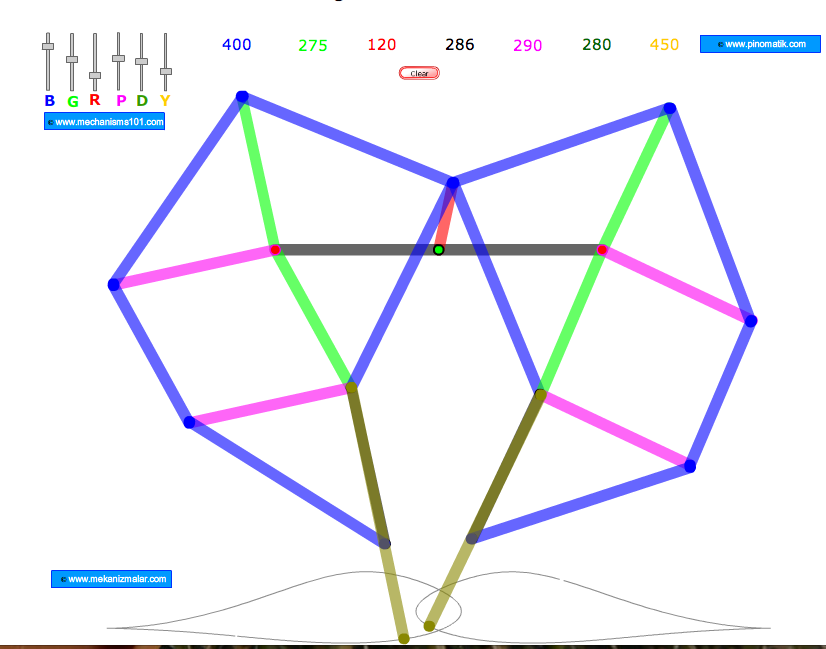
Anyway, I decided to work on linkages some more, and moved on to the Drag-Link Mechanism. As described by Marks’ Mechanical Engineers’ Handbook, it is a 4-bar linkage with the short side fixed, “used to feather the floats on paddle wheels.”
I constructed it first by eye from the diagram and got this:
And animated it here: Drag-Link Mechanism (preliminary).
Unsure what earthly purpose that could have, I googled paddle wheel floats, and came up with Buchanan’s Parallel Float Wheel:
All clear, I redrew the mechanism to achieve a feathered paddle. I imagine something like this could be used for all sorts of things, say keeping Ferris Wheel seats from pitching out their passengers. Fascinating as well are the variations on this wheel that control the pitch of the paddle. Feathering a paddle as you steer a canoe is practically an art, and it is remarkable that a mechanism had been developed to achieve this for a side-wheeler:
I’m very excited about this. Despite the fact that technology has moved on to the point of rendering much utterly obsolete, there is always something to learn from old inventions. Patent archaeology is invaluable even if it only helps to clarify a principle.
Add comment | March 17th, 2010
Wood Sculptures
By Mike Cohen on Day 4, March 2010
Originally for Day 4, I planned on making a single wood sculpture with whatever scrap wood we had in the shop. I thought I’d make something sort of symmetrical with small blocks. After completing the sculpture, I decided that I couldn’t stay away from technology and that making just one sculpture wasn’t enough. Inspired a bit by the Nobody Beats the Drum video for Grindin’, I decided to make a stop motion video disassembling and assembling sculptures. Being that everything I’ve done for 4-in-4 has been new to me, I figured I’d add stop motion to my skillset.
So here it is.
Add comment | March 16th, 2010
Atari ET Cartridge 3D Model: my first Blender project
By Greg Borenstein on Day 3, March 2010
For day 3 of the 4-in-4, I made a Blender model of an Atari cartridge, specifically, “ET: The Extra-Terrestrial” from 1983. This model is the first step on a large project I’m undertaking: a diorama depicting a hoard of millions of ET cartridges buried in a dump outside of Alamogordo, NM.
When Atari undertook the design of the game, they expected wild commercial success. The whirlwind development process was designed to capitalize on the incredible popularity of Steven Spielberg’s movie. Unfortunately, it also lead to an extremely poor level of quality in the final game, which was boring, confusing, and featured abominable graphics:
The result was millions of unsold cartridges that the company had no way to dispose of. Eventually, the hit on the solution of burying the cartridges in a dump outside of Alamogordo, New Mexico.
I first heard of the dumping from Nick Montfort’s excellent history of the Atari 2600 Racing the Beam. For more on the topic, see the Wikipedia and Snopes articles on the topic.
This 3D modeling project is the first step towards building a diorama depicting the full dump with millions of cartridges, the concrete slab that covers it, and the New Mexico dessert and sunset above.
To start out, I searched out high quality scans of the Atari cartridge online. I ended up finding them on Atari Age. Here, for example, is the front of the cartridge:
I used these high resolution scans and some other research to figure out the dimensions of the cartridge and set about building a basic rectangular solid that matched these dimensions.
I used Blender as my 3D modeling tool of choice on the recommendation of Scott Wayne Indiana. With lots of help from Scott, I managed to get going with the basics in Blender and, eventually, I had a rectangular solid with the right proportions:
(Note, both Scott and I found Super3boy‘s Blender tutorials to be incredibly useful in the process of getting started with this complicated program. It’s both humbling and really helpful to learn by listening to a bunch of tutorials narrated by a kid who sounds like he’s about 7.)
After I had that down, I started working on adding the cutaways for the stickers on the top and front. Using Blender’s “add difference marker” functionality, I was able to use separate rectangles to carve those out from the original slab. Then, finally, I added a bevel to the edge of the cartridge to simulate the roundness of the original:
Writing down this process in a few simple sentences makes it sound linear and straightforward. It was actually difficult and somewhat challenging. Without Scott’s help, the entire endeavor would have taken significantly longer.
Once I had the basic shape of the cartridge worked out, it was time to try to add the graphic stickers to the top and side. After an initial attempt to navigate Blender’s nest of menus (aided by this tutorial on textures in Blender) I eventually managed to map the image all over my entire object:
This was not quite what I wanted, but it was exciting to see an image actually appear for the first time. Eventually, I found the Blender wiki tutorial on multiple materials which explained how I could apply an image to just one specific surface of my object. This also made the Blender menu system start to make sense to me for the first time (by explaining the way selections made in certain menus modified the options available to you in others.) The result was a cartridge that was really starting to look right:
The end cap should have the ET logo image on it — which isn’t working for some reason I don’t understand — but otherwise this is really starting to be what I was aiming for. I even added an additional gnarled black texture to emulate the molded plastic of the non-sticker part of the cartridge. I’ll probably include that texture in the final print, but I’m not showing it here because it made it very hard to see the details of my 3D modeling in Blender’s preview images.
There are two next steps forward for me on this project. One of them is to get a 3D print made of this cartridge, mainly to gain experience with 3D printing. The second step is to make a model of the ET box and start combining multiples of that box and this cartridge into the limitless pile that sits under the Alamogordo sand.
1 comment | March 16th, 2010